Modifying Table Groups
Several event types may lead to altering a table group:
The table group definition may change: some tables or sequences may have been added or removed.
One of the Input Parameters linked to a table (priority, tablespaces, etc.) may have been modified.
The structure of one or more application tables in the table group may have changed, such as an added or dropped column or a column type change.
A table or sequence may change its name or its schema.
When the modification concerns a table group in LOGGING state, it may be necessary to temporarily remove the table or sequence from its table group, with some impacts on potential future E-Maj rollback operations.
Below are the possible actions.
Action |
Method |
|---|---|
Add a table/sequence to a group |
Tables/sequences assignment functions |
Remove a table/sequence from a group |
Tables/sequences removal functions |
Move a table/sequence to another group |
Tables/sequences move functions |
Change the log data or index tablespace for a table |
Tables properties modification functions |
Change the E-Maj priority for a table |
Tables properties modification functions |
Repair a table |
Remove from the group + add to the group |
Rename a table |
Remove from the group + ALTER TABLE + Add |
Rename a sequence |
Remove from the group + ALTER SEQUENCE + Add |
Change the schema of a table |
Remove from the group + ALTER TABLE + Add |
Change the schema of a sequence |
Remove from the group + ALTER SEQUENCE + Add |
Rename a table’s column |
Remove from the group + ALTER TABLE + Add |
Change a table’s structure |
Remove from the group + ALTER TABLE + Add |
SPLIT or MERGE partitions of a partitioned table |
Remove from the group + ALTER TABLE + Add |
Other forms of ALTER TABLE |
No E-Maj impact |
Other forms of ALTER SEQUENCE |
No E-Maj impact |
Adjusting the structure of table groups in LOGGING state may have consequences on E-Maj rollback or SQL script generation (see below).
Even if the table group is in LOGGING state, an E-Maj rollback operation targeting a mark set before a group change does not automatically revert this group change. However, the E-Maj administrator can manually perform the changes that would reset the group to its previous state.
Adding Tables or Sequences to a Table Group
The functions that assign one or more tables or sequences to a table group, which are used at group creation time, are also usable during the entire life of the group.
When executing these functions, the table group can be either in IDLE or in LOGGING state.
When the group is in LOGGING state:
An EXCLUSIVE lock is set on all tables of the group.
A mark is set. Its name is defined by the
p_markparameter of the function. This parameter is optional. If not supplied, the mark name is generated with an ASSIGN prefix.
Removing Tables from Their Table Group
The three following functions allow removing one or more tables from their table group:
SELECT emaj.emaj_remove_table(p_schema, p_table, p_mark);
or:
SELECT emaj.emaj_remove_tables(p_schema, p_tables, p_mark);
or:
SELECT emaj.emaj_remove_tables(p_schema, p_tablesIncludeFilter, p_tablesExcludeFilter, p_mark);
Input parameters and returned data are similar to the table assignment functions.
Notes
When multiple tables are removed, they do not necessarily belong to the same group.
When the table group or groups are in LOGGING state and no mark is supplied in the parameters, the mark is generated with a REMOVE prefix.
Removing Sequences from Their Table Group
The three following functions allow removing one or more sequences from their table group:
SELECT emaj.emaj_remove_sequence(p_schema, p_sequence, p_mark);
or:
SELECT emaj.emaj_remove_sequences(p_schema, p_sequences, p_mark);
or:
SELECT emaj.emaj_remove_sequences(p_schema, p_sequencesIncludeFilter, p_sequencesExcludeFilter, p_mark);
Input parameters and returned data are similar to the sequence assignment functions.
Notes
When the table group is in LOGGING state and no mark is supplied in the parameters, the mark is generated with a REMOVE prefix.
Moving Tables to Another Table Group
Three functions allow moving one or more tables to another table group:
SELECT emaj.emaj_move_table(p_schema, p_table, p_newGroup, p_mark);
or:
SELECT emaj.emaj_move_tables(p_schema, p_tables, p_newGroup, p_mark);
or:
SELECT emaj.emaj_move_tables(p_schema, p_tablesIncludeFilter, p_tablesExcludeFilter, p_newGroup, p_mark);
Input parameters and returned data are similar to the table assignment functions.
Notes
When several tables are moved to another table group, they do not necessarily belong to the same source group.
When the table group is in LOGGING state and no mark is supplied in the parameters, the mark is generated with a MOVE prefix.
Moving Sequences to Another Table Group
Three functions allow moving one or more sequences to another table group:
SELECT emaj.emaj_move_sequence(p_schema, p_sequence, p_newGroup, p_mark);
or:
SELECT emaj.emaj_move_sequences(p_schema, p_sequences, p_newGroup, p_mark);
or:
SELECT emaj.emaj_move_sequences(p_schema, p_sequencesIncludeFilter, p_sequencesExcludeFilter, p_newGroup, p_mark);
Input parameters and returned data are similar to the sequence assignment functions.
Notes
When several sequences are moved to another table group, they do not necessarily belong to the same source group.
When the table group is in LOGGING state and no mark is supplied in the parameters, the mark is generated with a MOVE prefix.
Modifying Table Properties
Three functions allow modifying the properties of one or more tables from a single schema:
SELECT emaj.emaj_modify_table(p_schema, p_table, p_changedProperties, p_mark);
or:
SELECT emaj.emaj_modify_tables(p_schema, p_tables, p_changedProperties, p_mark);
or:
SELECT emaj.emaj_modify_tables(p_schema, p_tablesIncludeFilter, p_tablesExcludeFilter, p_changedProperties, p_mark);
Input parameters and returned data are similar to the table assignment functions.
Notes
The p_changedProperties parameter is of type JSONB. Its elementary fields are the same as the p_properties parameter of the table assignment functions. However, this p_changedProperties parameter only contains the properties to modify. The properties not listed remain unchanged. It is possible to reset a property to its default value by setting it to null (the JSON null).
The functions return the number of tables that have effectively changed at least one property.
When the table group is in LOGGING state and no mark is supplied in the parameters, the mark is generated with a MODIFY prefix.
Determining the Table Group a Table or Sequence Is Assigned To
Two functions return the table group name a table or a sequence is assigned to:
SELECT emaj.emaj_get_assigned_group_table(p_schema, p_table);

SELECT emaj.emaj_get_assigned_group_sequence(p_schema, p_sequence);
If the table or sequence is not currently assigned to a group, both functions return a NULL value.
Thanks to these functions, it is easy to assign, move, or leave a table or a sequence as is, depending on its state.
These functions are callable by emaj_viewer roles.
Impact of Adding or Removing Tables or Sequences in a LOGGING Group
Caution
Once a table or a sequence is removed from a table group, any rollback operation will leave this object unchanged. Once unlinked from its table group, the application table or sequence can be altered or dropped.
The historical data linked to the object (logs, mark traces, etc.) are kept as is so that they can be examined later. However, they remain linked to the table group that owned the object. To avoid any confusion, log tables are renamed by adding a numeric suffix to their names. These logs and mark traces will only be deleted by a group reset operation or by the deletion of the oldest marks of the group.
Caution
When a table or a sequence is added to a table group in LOGGING state, it is then processed by any further rollback operation. However, if the rollback operation targets a mark set before the addition to the group, the table or sequence is left in its state at the time of the addition to the group, and a warning message is issued. Such a table or sequence will not be processed by a SQL script generation function call if the requested start mark was set before the addition of the table or sequence to the group.
Some graphs help to more easily visualize the consequences of adding or removing a table or a sequence to/from a table group in LOGGING state.
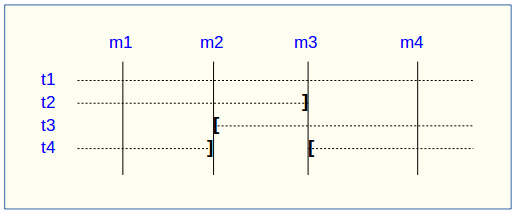
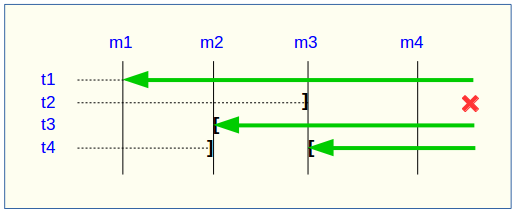
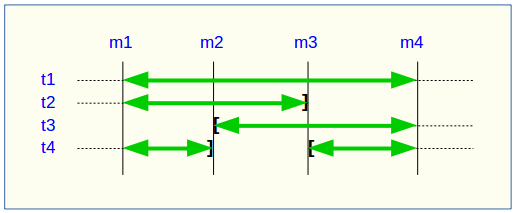
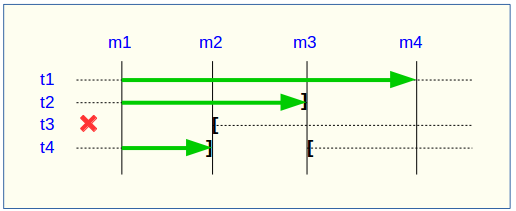
Let’s consider a table group containing 4 tables (t1 to t4) and 4 marks set over time (m1 to m4). At m2, t3 was added to the group while t4 was removed. At m3, t2 was removed from the group while t4 was re-added.
A rollback to the mark m1 would:
Process the table t1.
Not process the table t2, due to lack of logs after m3.
Process the table t3, but only up to m2.
Process the table t4, but only up to m3, due to lack of logs between m2 and m3.
A log statistics report between the marks m1 and m4 would contain:
1 row for t1 (m1, m4).
1 row for t2 (m1, m3).
1 row for t3 (m2, m4).
2 rows for t4 (m1, m2) and (m3, m4).
The SQL script generation for the marks interval m1 to m4 would:
Process the table t1.
Process the table t2, but only up to the mark m3.
Not process the table t3, due to lack of logs before m2.
Process the table t4, but only up to the mark m2, due to lack of logs between m2 and m3.
If the structure of an application table has been inadvertently changed while it belonged to a table group in LOGGING state, the mark set and rollback operations will be blocked by E-Maj internal checks. To avoid stopping, altering, and then restarting the entire table group, it is possible to simply remove the concerned table from its group and then re-add it.
When a table changes its assigned group, the impact on the ability to generate a SQL script or to roll back the source and destination table groups is similar to removing the table from its source group and then adding the table to the destination group.
Repairing a Table Group
Although the event triggers created by E-Maj limit the risk, some E-Maj components that support an application table (log table, function, or trigger) may have been dropped. In such a case, the associated table group can no longer work correctly.
To solve the issue without stopping the table group if it is in LOGGING state (and thus losing the benefits of the recorded logs), it is possible to remove the table from its group and then re-add it by chaining both commands:
SELECT emaj.emaj_remove_table(p_schema, p_table, p_mark);

SELECT emaj.emaj_assign_table(p_schema, p_table, p_group, p_properties, p_mark);
Of course, once the table is removed from its group, the content of the associated logs can no longer be used for a potential rollback or script generation.
However, if the log sequence is missing (which should never be the case) and the table group is in LOGGING state, it is necessary to force the group’s stop before removing and re-assigning the table.
It may also happen that an application table or sequence has been accidentally dropped. In this case, the table or sequence can be simply removed a posteriori from its group by executing the appropriate emaj_remove_table() or emaj_remove_sequence() function.